
Do not lose valuable orders anymore. Some purchases are abandoned simply because a customer was in a hurry or distracted by the wide choice of e-shops. Give your clients a second chance and help them finish what they started.
More than half of all online orders are never completed, yet research shows that up to 8 % of them can be recovered with the right remarketing strategy. Reach back out to customers and let them finalize their purchase.
Get the most out of your email marketing strategy and e-shop operations. The abandoned cart feature is free and takes only a few clicks to set up.
How to set up the abandoned cart
Setting up an automated campaign that brings customers back is simple.
- Add a tracking code to your website. You can find instructions here. (If you are a Shoptet client, skip to step 2.)
- In our app, create a new campaign. You will find the abandoned cart template among the basic templates under the name “Abandoned cart.”

- Prepare the content and design of your campaign. Do not edit the block that displays products. It is filled automatically. Remember to include a link that takes customers directly to the shopping cart on your website.

- In step 4 of your campaign under “When do you want to send the campaign?” choose Automatically and select the campaign type Abandoned cart. Enter the number of minutes after which the campaign should be sent to a visitor who did not complete the order. We recommend checking the option “Send emails repeatedly”. If this option is not selected, the campaign may only be sent once and not trigger again for a future abandoned order.

- You can also set the abandoned cart campaign as a transactional campaign. This allows you to send it even to contacts who unsubscribed, and you do not need to include an unsubscribe link.
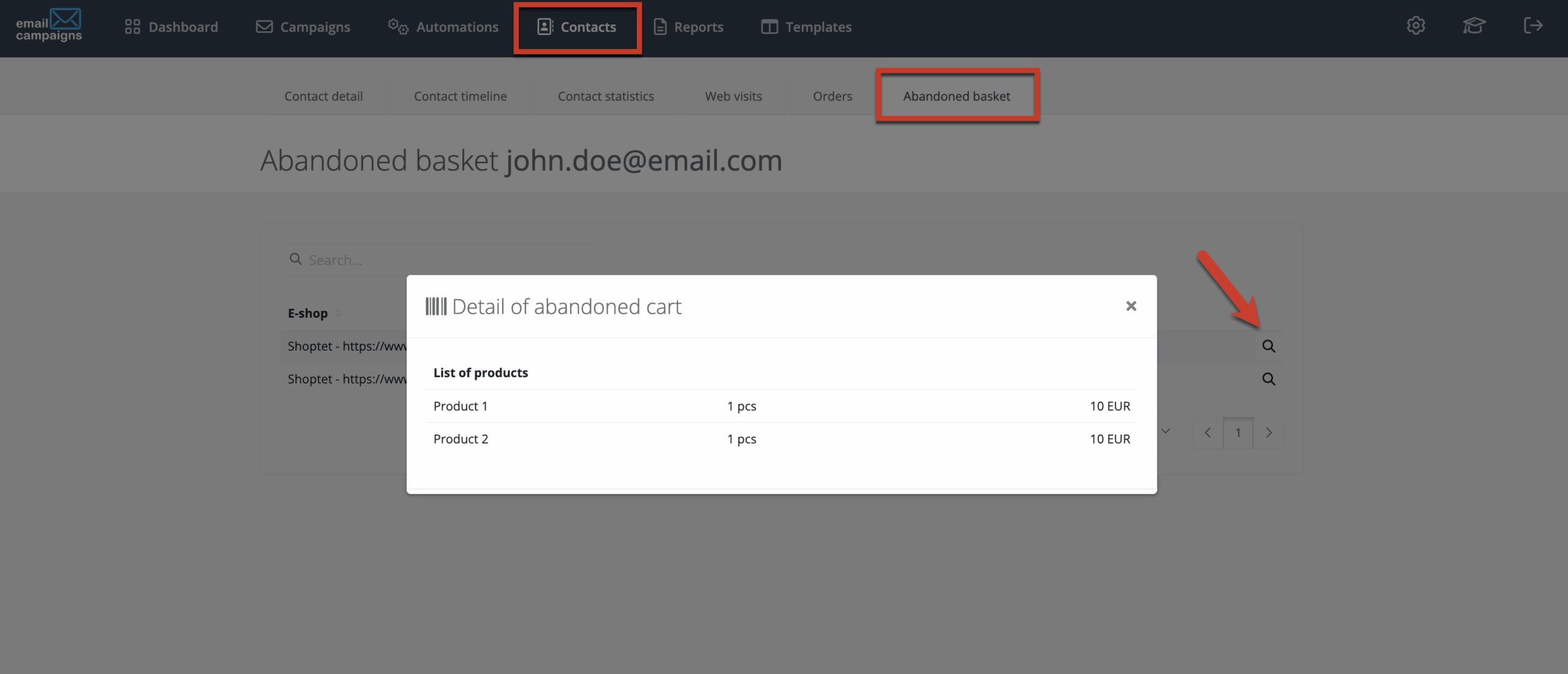
- After sending, you can track abandoned cart data directly in the client’s profile. You can see who left without completing their purchase and which products remained in the cart. Go to the Contacts section, select a customer and click on the Abandoned cart tab. By clicking the magnifying glass icon, you will see a detailed overview of the cart including product names, quantities and prices.
Need to integrate the abandoned cart block into your custom template? No problem. We can add a tailor-made block for you. Just contact us at support@emailcampaigns.eu.
Timing, Strategy and Design That Drive Conversions
-
Recovering abandoned carts is still one of the most effective remarketing strategies.
-
The ideal time to follow up on an abandoned product is within 12 hours of leaving the e-shop, preferably later in the day or evening. One reminder is often not enough. Use a sequence of one or two additional emails for best results.
-
Entice customers with engaging or playful design, reassure them with clear information about hassle-free returns and easy claims, and consider suggesting alternative products. Sometimes a similar item can be even more appealing.
Need more information? Want help with a specific campaign or with your overall email marketing? Contact us. We will be happy to discuss the possibilities with you. With more than 10 years of experience, we know how to turn strategy into results.